Zoí
Zoí Documents
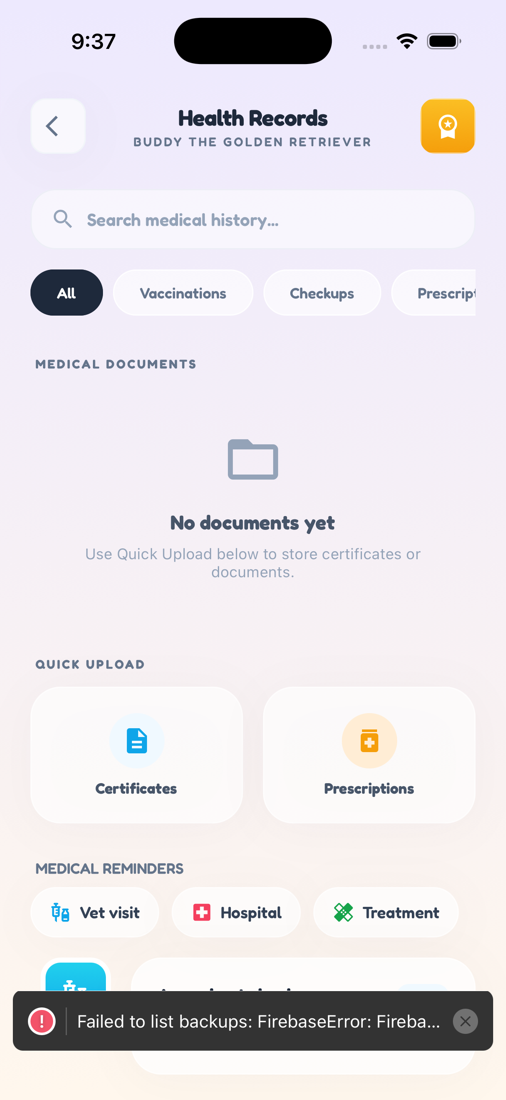
Health Records
Secure, per-pet storage for certificates, prescriptions, and care history — with Zoí AI to explain prescription photos before you save.
How to open: Health tab → tap Records in the header.
How to use Health Records
-
Open Health Records
From Health, tap Records in the header.
-
Filter documents
Use filters such as All, Vaccinations, Checkups, Prescriptions, Lab Results, Surgeries, or Other.
-
Upload a certificate
Use Quick Upload → Certificates, snap or pick a photo, choose a type, name it, and save.
-
Explain a prescription
Use Quick Upload → Explain. Photograph a prescription; Zoí suggests an explanation and meds for you to review, then save.
-
View or re-explain a file
Open a document under Medical Documents to View Document or Explain with Zoí.
-
Add medical reminders
Create Vet visit, Hospital, or Treatment reminders from the records flow, then review the care timeline.
Video guidance
A deeper visual walkthrough for Health Records.
This section is ready for a step-by-step walkthrough of Health Records. Until then, follow the instructions above in the app.
Also included
- Cloud storage tied to each pet
- Share a document or folder for vet visits
- Timeline of visits, vaccines, and treatments