Zoí
Zoí Home
Daily Routines
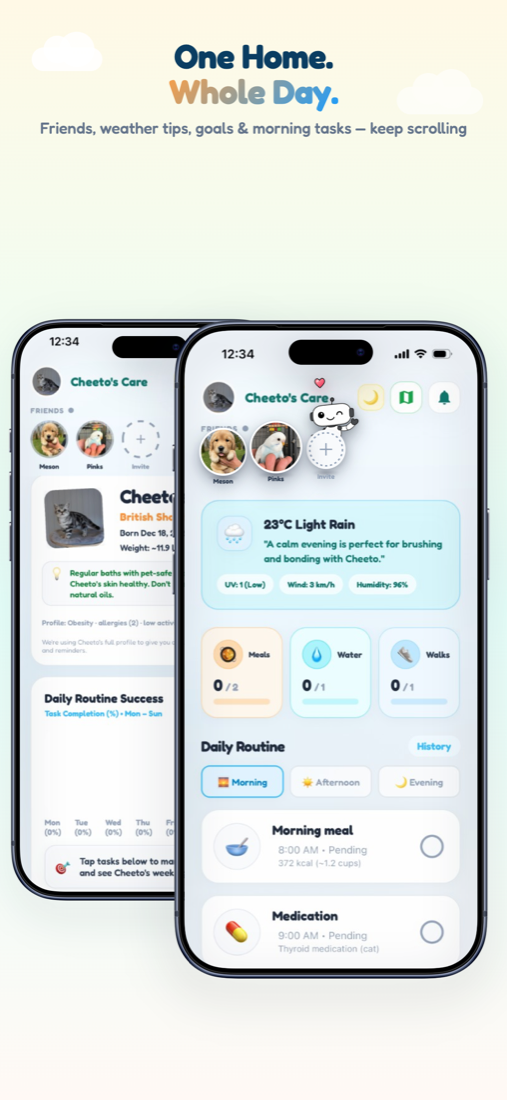
Your pet’s day in one place — Morning, Afternoon, and Evening tasks with quick stats for meals, water, walks, and meds.
How to open: Open the Home tab at the bottom of the app.
How to use Daily Routines
-
Open Home
Tap the Home tab. The header shows your active pet’s care screen.
-
Check today’s overview
Review Daily Routine Success (weekly bars) and the Meals, Water, Walks, and Pills stat cards.
-
Pick a time of day
Switch between Morning, Afternoon, and Evening. Zoí auto-selects based on the current time.
-
Complete a task
Tap the circle on a routine card to mark it done. Progress updates and celebrations may appear.
-
Log from a stat card
Tap Meals, Water, Walks, or Pills for a quick log when you need to catch up.
-
Review history
Tap History next to Daily Routine to see past days and completion percentages.
Video guidance
A deeper visual walkthrough for Daily Routines.
This section is ready for a step-by-step walkthrough of Daily Routines. Until then, follow the instructions above in the app.
Also included
- Friends strip and Invite on Home
- Weather tip personalized for your pet
- Mood Tracker chips and daily challenges
- Vaccinations card with schedule shortcuts