Zoí
Zoí Alerts
Notifications
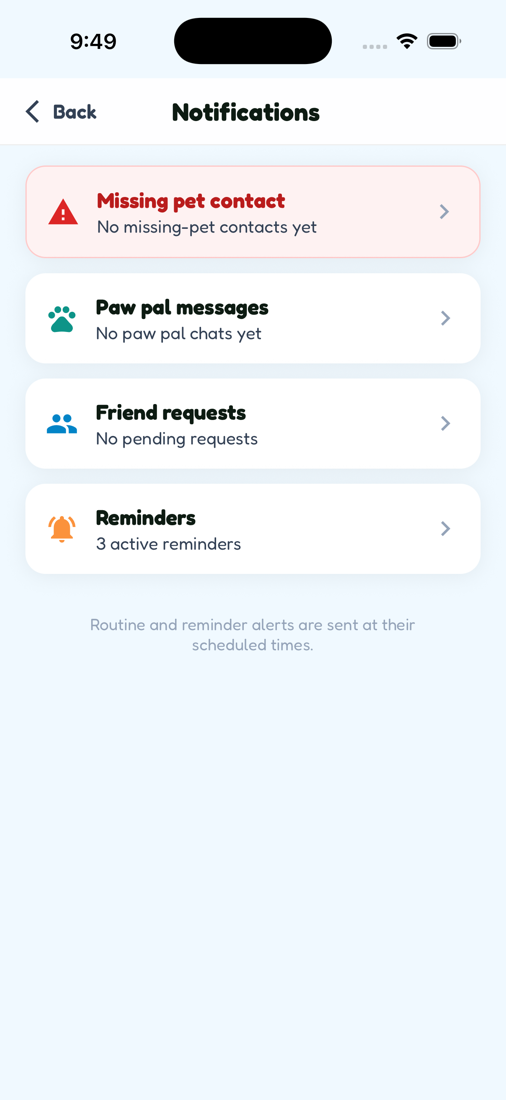
Phone alerts for routines and reminders, plus an in-app center for chats, friend requests, and missing-pet contacts — with quiet hours and sounds.
How to open: Home header bell, or Settings → Notifications.
How to use Notifications
-
Open the Notifications center
On Home, tap the bell icon to see chats, friend requests, missing-pet contacts, and Reminders.
-
Open notification settings
Go to Settings → Notifications to manage preferences.
-
Allow system permission
Enable OS notification permission if Zoí prompts you.
-
Customize sound & preview
Choose sound and vibration, lock-screen preview, and badge options.
-
Set quiet hours
Pick quiet hours start and end so alerts respect your downtime.
-
Stay synced
When signed in, preferences sync to the cloud across your devices.
Video guidance
A deeper visual walkthrough for Notifications.
This section is ready for a step-by-step walkthrough of Notifications. Until then, follow the instructions above in the app.
Also included
- Shortcut to Reminders from the center
- Missing pet contact threads
- Friend request inbox