Zoí
Zoí Schedule
Pet Schedule
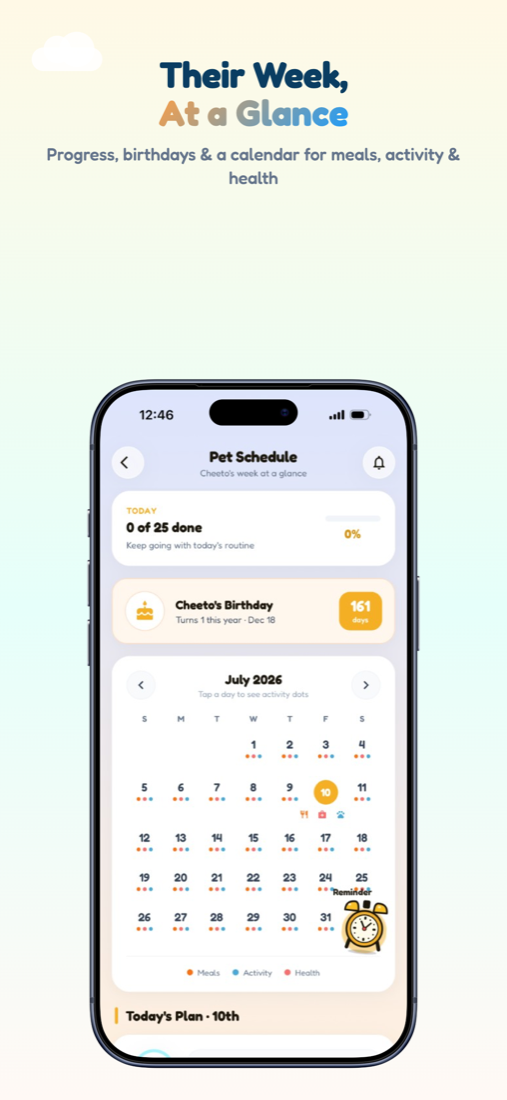
A clear week view with today’s progress, birthday countdown, calendar dots, Today’s Plan, and upcoming reminders.
How to open: Open the Schedule tab (Pet Schedule).
How to use Pet Schedule
-
Open Schedule
Tap the Schedule tab to open Pet Schedule.
-
See today’s progress
Check the Today summary and progress ring for completed tasks.
-
Browse the calendar
Use the month calendar — dots mark meals, walks, and medical items.
-
Review Today’s Plan
Scroll timed items for the day and This Week’s Routine for day-by-day completion.
-
Check upcoming items
Swipe Upcoming Reminders or tap See all. Review Next 7 Days for birthdays, vet visits, and dated events.
-
Jump to reminders
Tap the alarm button / FAB to open Pet Reminder and add or edit alerts.
Video guidance
A deeper visual walkthrough for Pet Schedule.
This section is ready for a step-by-step walkthrough of Pet Schedule. Until then, follow the instructions above in the app.
Also included
- Birthday card when date of birth is set
- Mirrors Home routine completions
- Multi-pet upcoming list in See all